Local first outliner, macOS, iPad, iPhone
The outliner that answers back.
DayPrivate is an outliner with a real clock attached. Choose two or three outcomes for the day, put them on the grid, and let the app say something when the day drifts. Every word stays on your own devices. If you arrived comparing day planner apps, start there instead, and if you already block your days, the time blocking app page goes through the grid in detail. The longer read on DayPrivate as a local first outliner starts from the tree, not the planner. Still weighing an app against a paper daily planner? That comparison has its own page, including the parts paper does better.
No account. No server. No telemetry, not even anonymised.
It is a file on your disk
Your outline saves to a local database as you type. There is nothing to log in to, because there is nothing to log in to.
Sync is your own iCloud
Your devices trade encrypted change sets through your iCloud Drive under a passphrase that never leaves the keychain.
The AI runs on your machine
The optional writing help talks to a model on the same computer. Any endpoint that is not this device is refused in code.
Heard this
If your planner never becomes the day, this is the thread.
We read what people actually post about planners, outliners, and AI calendars. The same words keep coming up. The cards are paraphrases of those threads, not quotes from named users.
I have a beautiful graveyard of plans.
The planner costs more than the work.
I could not cancel the trial.
The AI calendar will not let me put the block where I want it.
Tasks and the clock live in different apps.
Integrations dumped undated junk into today.
Structured will not sync, and taps take seconds.
Workflowy now punishes me for editing.
Daily notes scattered everything.
Source: paraphrases of recurring themes across r/productivity, r/Sunsama, r/Akiflow, r/UseMotion, r/Workflowy, r/logseq, r/PKMS, and r/ProductivityApps. Not quotes from named users.
One day, start to finish
Most planners take your list and hand it back to you. This one takes a position on the day.
Every part of DayPrivate exists to close one loop: decide what today has to produce, give it real hours, work it, and be told the truth about what happened. Here is that loop on a real clock.
Decide what the day owes you.
Plan today plans by outcome, not by list. Pick two or three outcomes, write the Result you want by tonight and the Purpose behind it, then fill in the actions that get you there. Past three outcomes a quiet chip reminds you that three is the sweet spot. Nothing is ever blocked. If you already plan this way, the structure will look familiar: here is how DayPrivate builds the rapid planning method in.
An action can be new text, or a task that already lives in your outline: press slash and pull it in as a mirror, so completing it here completes the real task where it lives. Mark the priority as you go, and MUST rows carry a red edge everywhere they appear.
Outcome card
Two qualified leads in the pipeline
Because December closes on what July started.
Give it hours the day actually has.
Drag an action onto the grid and it takes its estimate. Better, block the outcome as one chunk with the clock button on its card, then work the actions from inside it. Nine to eleven is one outcome you are inside, not four errands stacked against a wall.
Auto-block does the whole day in one press, around your calendar and inside your day start and day end, and names what did not fit. The time blocking software page covers the grid properly: the rules auto-block follows, what happens when it cannot read your availability, and the five ways a blocked day usually comes apart.
One timer, running on the thing in front of you.
Every bullet, every plan row, every block big enough to hold the control has a play button. Only one timer runs at a time, so starting one pauses the other and completing a task pauses its own. On the Mac the menu bar carries the task and the elapsed time while it runs.
Focus mode hides the sidebar and the planner and dresses the outcome for work: the result large, the purpose in full, the block window and a live countdown, checkboxes and timers on every action. When the session ends, Read the session turns your own notes and tracked time into a short readout you can save onto the outcome, written by a model running on your machine.
When a block ends with work still open, it asks. Once.
The usual outcome of a missed block is silence: the work slides and nobody decides anything. Here one quiet card appears while you can still act on it, and dismissing it is a decision, so it never asks twice about the same ending.
Between blocks a now line names the next MUST and the free window that would actually fit it, counting your meetings as well as your own blocks. At the end of the day the same card closes the day, and the next morning a carry tray offers to bring the unfinished work forward, one day at a time, leaving what you finished behind as the record.
Block ended, 45m of MUSTs still open
A week you can read, derived from what you did.
Review opens on the last complete Monday to Sunday week. What happened lists each goal's tracked share, the time aligned to nothing with an inline repair, and how each dated goal's pace stood as the week closed. Next week reads your dated, estimated goals and offers to block the gap of any that is behind, in next week's genuinely free hours.
None of it is self reported. It is your tracked time, your blocks, your carries, and your calendar, read back to you. It never asks you to rate the week or journal about it.
Everything in it
An outliner first, and a planner that respects it.
Plans are ordinary bullets in your outline, so they search, mirror, export, and sync like everything else. Nothing in this app is a special object you cannot open.
The outline
The part you live in all day.
Infinite nesting and zoom
Click any bullet's dot and it becomes the whole page, with breadcrumbs back out. The zoom you left in is the zoom you return to.
Full keyboard outlining
Enter, Tab, Shift + Tab, move, complete, duplicate, delete a subtree, undo in bursts, bold, italic, underline.
Notes on any bullet
Shift + Enter opens a note underneath, collapsed to its first line until you want the rest.
Multi bullet selection
Shift arrows, shift click, or sweep across rows, then indent, move, complete, or delete the whole group as one undo step.
Mirrors
One task that genuinely lives in several places. Edit, complete, or time it anywhere and the original changes.
Links and backlinks
Type two brackets to link a bullet, and see everything pointing at what you are reading.
Search, tags, and stars
Live filtering that keeps matches in context, project and area tags as pills, and starred views pinned in the sidebar.
Jump menu
Cmd + K fuzzy searches every bullet, and a greater than sign turns it into a command palette.
Dates, times, and repeats
Type an exclamation mark for a date or deadline, with presets and a custom builder for every kind of repeat, fixed or after completion.
Estimates
Type a tilde for a time estimate, which then sets how long the work takes on the grid.
Types and views
Checkboxes, headings, and boards, plus board and timeline views of any zoomed bullet.
History and attachments
Up to fifty versions per bullet, restorable through the normal undo path, and files that live on the bullet they belong to.
Planning the day
The rapid planning method, made structural rather than aspirational.
Outcomes with a result and a purpose
Each outcome states what will be true tonight and why it matters, above the actions that get you there.
MUST and SHOULD
Two levels of priority that sort the list, mark the row, and follow the work onto its block.
Pull in existing work
Browse or search your whole outline from the add row; what you pull in arrives as a live mirror, never a copy.
Outcome chunks
Block a whole outcome as one span, sized by the estimates still left inside it.
Auto-block
The whole day in one press, around your calendar, with an Undo that removes exactly the blocks it made.
Templates
Save an outcome's shape, result, purpose, and actions, and start tomorrow from it.
Carry unfinished
Move what you did not finish to tomorrow under the same outcome, while today keeps its record.
Draft from notes
Turn a paragraph of thinking into a proposed plan with editable estimates, accepted only when you say so.
Time on the clock
Time blocking, timers, and the actual overlay in one place.
Day and week grids
Twenty four hours in half hour slots, with fifteen minute snapping when you drag, move, or resize.
Timers everywhere
On outline rows, plan rows, page titles, outcome cards, and blocks. One runs at a time, and it survives a crash.
The actual overlay
Lay the time you really spent beside the time you planned, on the same grid.
Idle return
Step away while tracking and the app offers to trim the idle span rather than quietly counting it.
Menu bar timer
The running task and its elapsed time in the macOS menu bar, with pause, capture, and quit that finishes the timer first.
Quick capture
A global hotkey window that drops the thought into your Inbox without leaving what you were doing.
Day planner rail
Pin a single day beside the outline and drag bullets straight onto it.
Focus mode
Hide every panel and work one outcome, with an exact restore when you come out.
Calendars
Planning around the meetings you really have.
Apple Calendar, both ways
On the Mac your blocks are mirrored into the calendar you choose, and moving or deleting the event pulls the change back.
Google Calendar, read only
Connect with your own OAuth client. Sign in happens in your browser and the tokens sit in your keychain.
External events as context
Other people's meetings show beside your blocks in a muted style, and never count toward your planned or tracked time.
Real availability
Auto-block and Block the gap fill only genuinely free time, and abort rather than book over something they could not read.
Sync window
Choose how far ahead events are read and blocks are mirrored: thirty, ninety, or one hundred and eighty days.
Deadline and block alerts
A notification when a block starts and when a deadline lands, with the lead time you pick.
Goals and direction
The reason a Tuesday matters.
Goals with dates and estimates
Point work at a goal and the app keeps the books: tracked time, share of the week, commitments still on the calendar.
Alignment
Where the hours went, by goal or by area, with the unaligned time named plainly and repairable inline.
Pace and the gap
A dated, estimated goal gets a pace verdict and a button that books the make up time in real free hours.
Area targets
Give the steady maintenance work a share of the week, so it is visible when it starves.
Compass
Vision, Identity, and Standards, with reset recordings and thirty day experiments beside them.
Morning and night review
The same direction twice a day: once to choose the day, once to record what the day proved.
Year Plan
The outcomes that must be true by the end of each quarter, assigned to the goals Alignment already reads.
Year Map
A read only footprint of the year: one cell per day, colored by what the plan actually did with it.
Looking back
Numbers you did not have to type.
Weekly review
What happened and what next week needs, with prev and next weeks and a Plan Monday button.
Weekly report
Tracked time per task and per project or area against planned time, by week or by calendar month.
Calibration
Your estimates compared with your tracked time, so the next estimate is closer.
Today and Upcoming
What is overdue, due, blocked, and tracked today, and the same across the next fourteen days.
Weeks Left
Your life as a grid of weeks, for the goals that have a date on them.
Export
OPML, plain text, CSV, and a self contained HTML report. Your data leaves in a form you can read.
Getting started
The first hour, handled.
A guided tutorial
Fifteen short steps that walk the whole app and park it on the surface each step describes. It opens itself on a new device and can be run again from Settings whenever you want.
Help that matches the build
A searchable reference for every feature and every keyboard shortcut, written against what actually ships.
Nothing to configure first
No account, no workspace, no project setup. Open it and start typing.
See it running
A plan you can see, and a day that answers.
Real captures from an isolated demo workspace. Every name, project, goal, and time entry shown here is fictional.
Choose the outcomes that make the day count, then make the MUSTs and SHOULDs explicit.
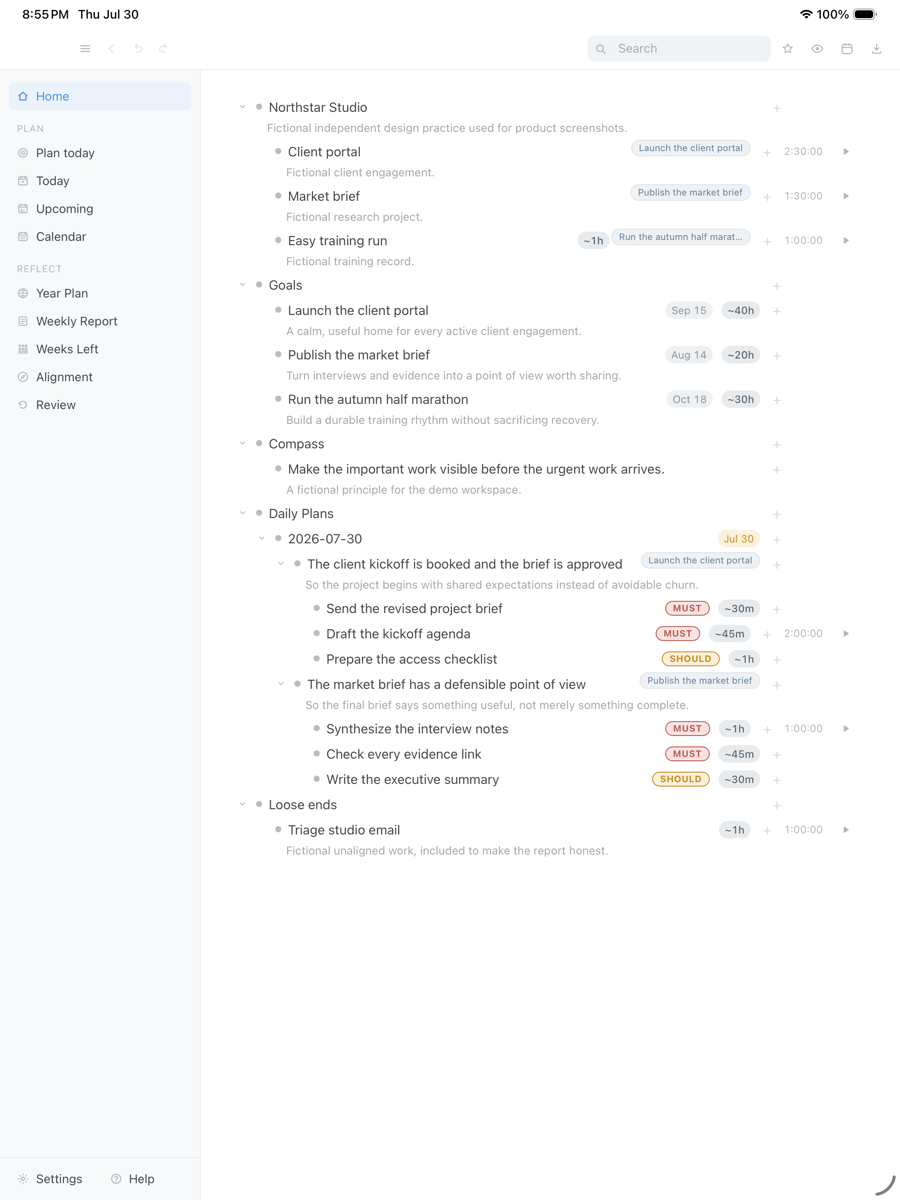
Drag the capture sideways to see the rest. Open full size
When a block ends with important work left, decide what happens while the context is still fresh.
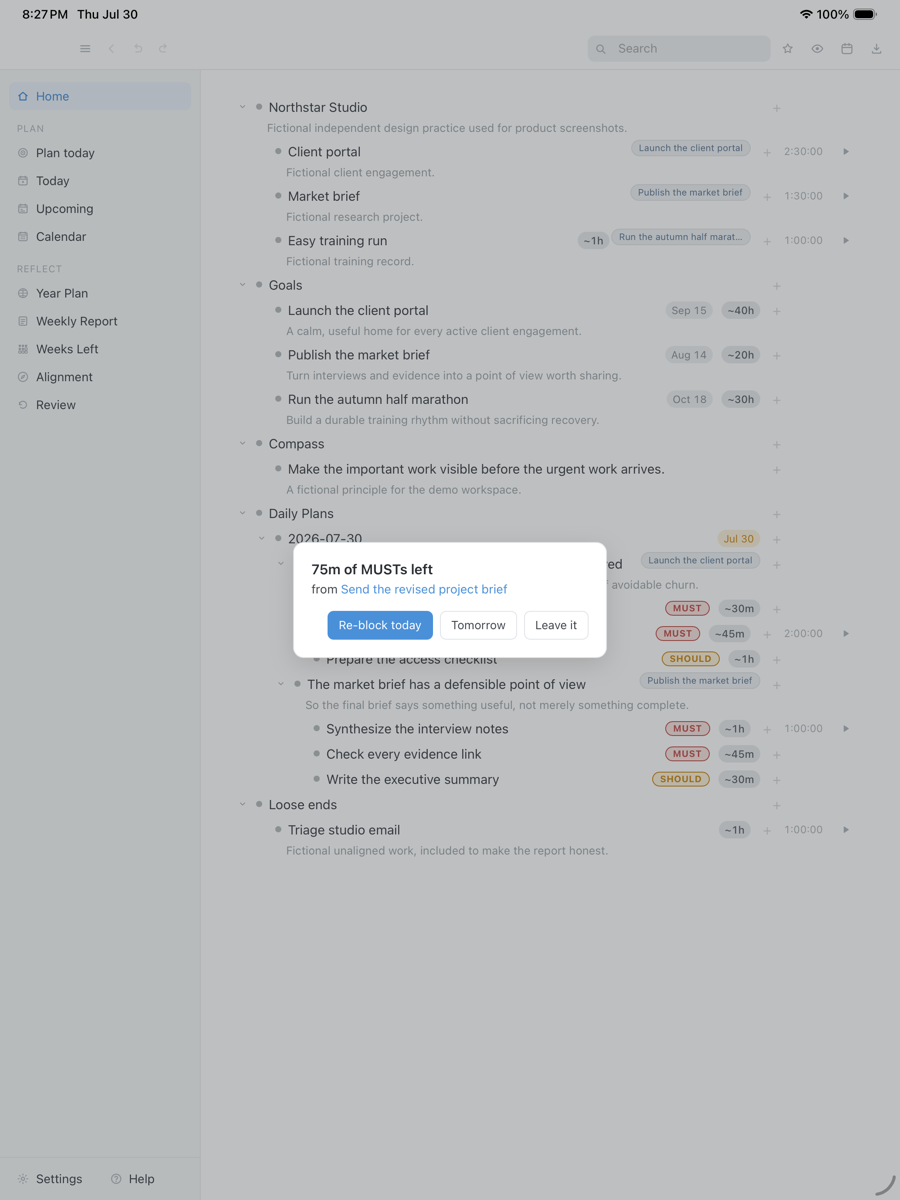
Drag the capture sideways to see the rest. Open full size
See where the hours actually went, including unaligned time and a goal that has been starved.
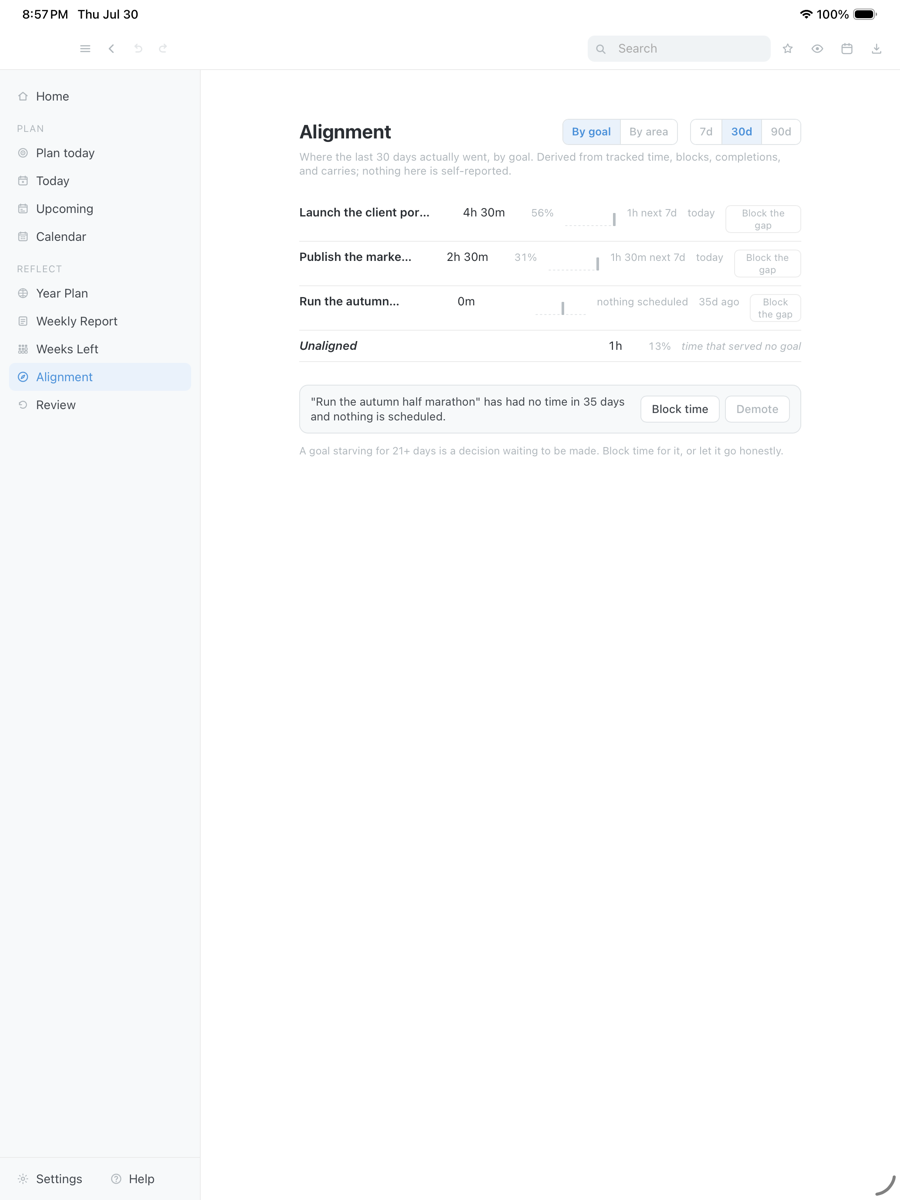
Drag the capture sideways to see the rest. Open full size
Where your data is
Privacy here is not a policy page. It is the absence of a server.
There is no account to make, because there is nothing to log in to. The only traffic that leaves a device is traffic you ask for: encrypted sync through your own iCloud Drive, or a calendar you connect. The optional AI features talk to your own machine and are refused anywhere else.
Your outline is on your disk
Text is written a moment after you stop typing and structural changes immediately, to a database file whose path the app shows you.
Nothing is measured
The app measures nothing: no analytics, no crash pings, no usage counters. Not anonymised, not aggregated, none. This marketing site is separate and does use ordinary web analytics.
Sync you hold the key to
Devices exchange encrypted change sets through your own iCloud Drive under a passphrase that stays in the device keychain.
The AI cannot leave the machine
The optional writing features refuse any endpoint that is not this computer, in code rather than as a setting, and there is no cloud fallback.
Recordings stay put
Vision, identity, and reset recordings are transcribed by Apple's on device speech recognition, so the audio is not sent anywhere.
A safety net you own
A snapshot of the database once per local day, the newest thirty kept, plus back up and restore on demand.
On your devices
The Mac leads. The iPad and iPhone carry the day with you.
The same outline on every device, over your own iCloud. Some surfaces are macOS only because they are native macOS surfaces, and the table says which.
| Capability | Mac | iPad | iPhone |
|---|---|---|---|
| Outline, plans, blocks, timers | Yes | Yes | Yes |
| Encrypted device sync | Yes | Yes | Yes |
| Touch gestures, sheets, multi select | Pointer instead | Yes | Yes |
| Read your Apple Calendar | Yes | Yes | Yes |
| Mirror blocks back into the calendar | Yes | Mac writes it | Mac writes it |
| Google Calendar | Yes | Not yet | Not yet |
| Menu bar timer and quick capture | Yes | macOS only | macOS only |
| Local AI features | Yes | macOS only | macOS only |
| On device transcription of recordings | Yes | Yes | Yes |
Where it actually is
The app does not oversell your week, so this page will not oversell the app.
- In useDayPrivate is in daily use and under active development. The Mac, iPad, and iPhone builds run the same outline over encrypted sync.
- Not outThe public build is not released yet and it is not on the App Store. The form below is how you hear when it is.
- No teamThere is no sharing, no collaboration, and no team plan. It is built for one person's day.
- Apple onlyThere is no Windows build, no Android build, and no browser version. It is a native Mac, iPad, and iPhone app, so if your day happens on a PC this is not your planner.
- Mac firstReading your Apple Calendar works on every device. Mirroring blocks back into it, Google Calendar, the menu bar timer, quick capture, and the local AI features are macOS surfaces, so they live on the Mac.
Pricing
Pay monthly, or pay once for the year and save.
One plan with everything in it. Every feature, on every device you own, for one person. There is no team tier to be upsold to and no feature held back for a higher one.
Monthly
$8 per month
Cancel whenever you like.
- Everything in the app
- Mac, iPad, and iPhone
- Encrypted sync across your devices
- Every update while your plan is active
- Your outline stays yours either way
Annual
$69 per year
One charge a year, not twelve.
- Everything in the app
- Mac, iPad, and iPhone
- Encrypted sync across your devices
- Every update while your plan is active
- Your outline stays yours either way
If your plan lapses, the last version you paid for keeps working. You keep your local outline and exports; an active plan pays for future updates, not access to your own work.
One message, then nothing
Hear when the build is ready.
One email when DayPrivate is ready to install, and nothing else. No drip sequence, no newsletter.
Your address is used for that one message and nothing else.
Questions
The things worth asking first.
Is this an outliner or a planner?
Both, and in that order. It is a full outliner with infinite nesting, zoom, mirrors, backlinks, and keyboard editing, and the planning sits on top of it rather than beside it: plans, blocks, and tracked time are ordinary bullets in the same outline. If you are weighing this against other planners rather than reading about this one, the day planner app page covers that comparison. If you already plan by result and purpose, the rapid planning method app page goes through that structure in detail.
Is there a Windows, Android, or web version?
No. DayPrivate is a native macOS, iPadOS, and iOS app, and there is no browser version. If you plan your day on Windows or Android, this is not the app for you.
What am I paying for, if there is no server?
The work. Your outline runs on your own machine and costs nothing to host, so the plan pays for the app being built, fixed, and kept current with macOS and iOS rather than for storage you already own.
Where is my outline stored?
In a local database file on your device. Settings shows you the exact path, and you can export the whole thing to OPML or plain text at any time.
How does sync work without an account?
Your devices write encrypted change sets into your own iCloud Drive. You choose one passphrase and enter it on each device. Nobody, including this app's author, can read those files.
Do I need to run an AI model?
No. Every AI feature is optional and off until you install a model on your own machine. Without one the rest of the app is unchanged.
Is it a WorkFlowy replacement?
The outliner is built in that tradition, with the shortcuts, zoom, and mirrors you would expect. The difference is the clock attached to it. The WorkFlowy alternative page is the comparison, including the parts WorkFlowy still does better. People leaving a premium daily planner should read the Sunsama alternative page. If the question is goals with hours attached, start at the goal setting app page.
What happens if I stop using it?
The last version you paid for keeps working. Your file stays on your disk, your exports stay readable, and nothing is held hostage by a login.